
By Liam Tremblay — IPTV Technology Analyst | IPTV Explained | Last updated: July 2026
What is IPTV? It is a way of delivering television content over your internet connection instead of through a cable or satellite dish—and it works on any device you already own in Canada: Fire Stick, Android TV box, smart TV, iPhone, or laptop. There is one thing most guides do not tell you upfront, though: before your login credentials will do anything, you need a player app installed on your device first. That single detail is where most Canadian beginners get stuck — and this guide covers it clearly. For a broader introduction, visit IPTV Concepts or start with our Start Here guide.
Quick Answer
IPTV delivers television over your internet connection instead of through a cable or satellite dish. In Canada, it works on any device — Firestick, Smart TV, Android box, or phone. Two things are required before anything works: a player app such as Tivimate or IPTV Smarters is installed on your device, and credentials from your provider are in either M3U or Xtream Codes format. Without the player app installed first, the credentials will not function.

What Is IPTV and What Does It Stand For?
IPTV stands for Internet Protocol Television—a method of delivering television content over an internet connection using the same IP technology that powers websites, email, and video calls. Instead of receiving a broadcast signal through a coaxial cable or satellite dish, your device downloads a continuous stream of data from a remote server and plays it as video.
The technology itself is not exclusive to third-party services. Bell Fibe TV, Rogers Ignite TV, and Telus Optik TV are all IPTV services — they deliver television over internet infrastructure rather than traditional broadcast methods. The distinction between these managed ISP services and the third-party IPTV subscriptions most Canadians ask about is who controls the content licensing and the server infrastructure. For plain-English definitions of all IPTV-related terms, see our IPTV Glossary.
Key takeaway: IPTV is simply television delivered over the internet — the technology is used by Bell, Rogers, and Telus as well as by third-party subscription services.
How Does IPTV Actually Work in Canada?
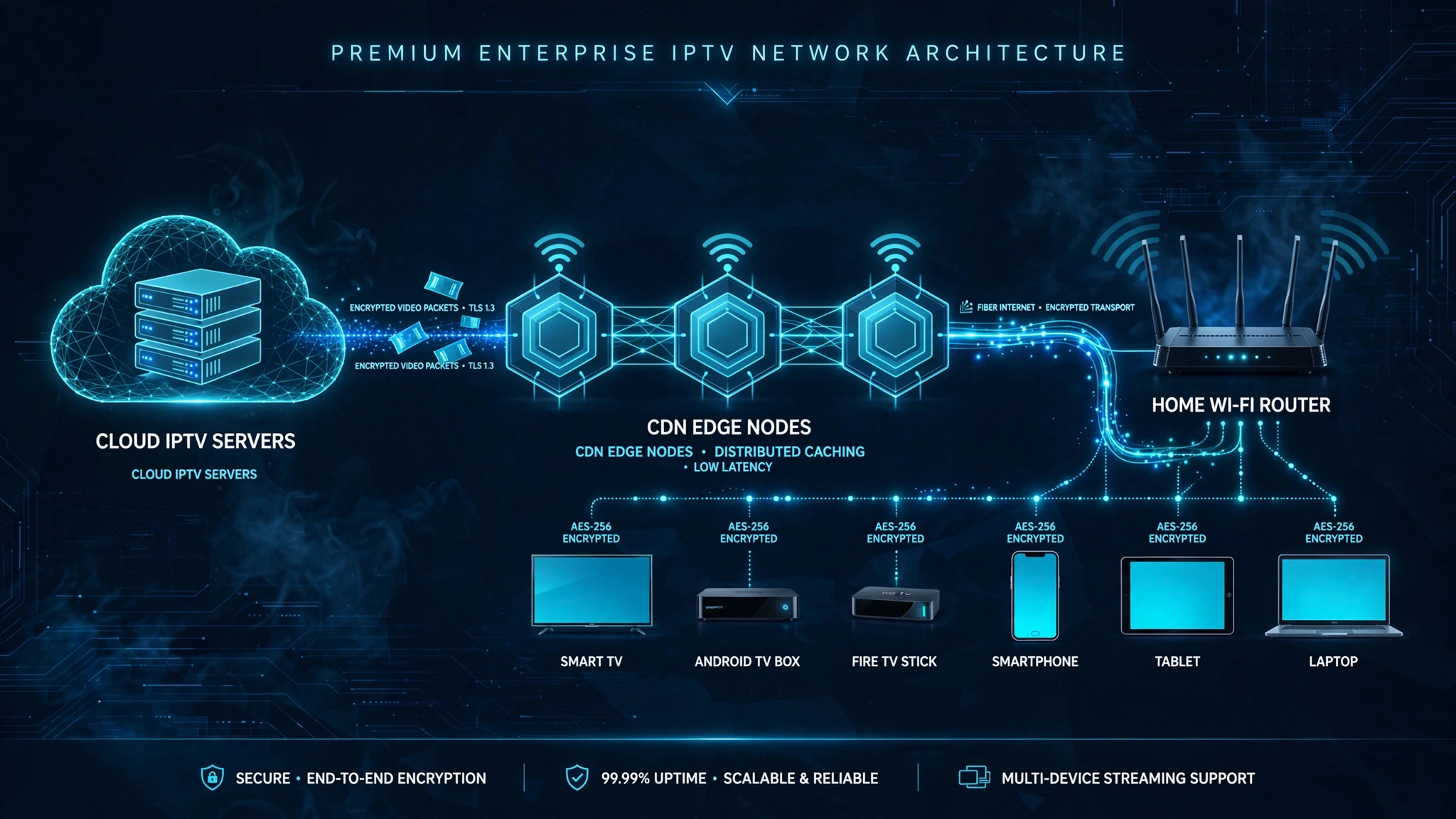
When you select a channel, your device sends a request to a remote server. That server locates the video stream and begins transmitting it as small data packets. Your device reassembles those packets and plays them as continuous video and audio — the entire process happens in fractions of a second on a stable connection.
The delivery relies on one of two main streaming protocols. HLS—HTTP Live Streaming, developed by Apple and documented at developer. apple.com/streaming — breaks the stream into small HTTP segments that are compatible with virtually every device. MPEG-TS (MPEG Transport Stream) delivers video as a continuous real-time stream with lower latency, making it preferable for live sports. Both protocols are explained in our IPTV glossary.
What Happens When You Press Play
- Your device sends a request to the IPTV server using your credentials
- The server authenticates your subscription and locates the channel stream
- The stream is transmitted through a CDN—a Content Delivery Network—a distributed system of servers that minimises the distance your data travels
- Your device receives, decodes, and plays the stream in real time
Why Your Canadian ISP Matters More Than You Think
In Canada, Bell and Rogers actively manage internet traffic — including IPTV streams — on their networks. This practice is permitted under current CRTC regulations. The practical result: a stream that performs perfectly on one connection may buffer or drop on another, even with identical internet speeds. Telus users generally report fewer throttling-related issues, but individual results vary by location and connection type.
Key takeaway: ISP traffic management by Bell and Rogers is one of the most common causes of IPTV performance issues in Canada — and most international IPTV guides do not mention it.
The Step Most Canadian Beginners Miss — You Need an App First
Here is what most IPTV guides do not explain clearly — including the top results for this search in Canada.
In my experience helping Canadian viewers troubleshoot IPTV setup problems, one of the most common sources of confusion is that many expect their login credentials to work immediately after subscribing. They receive a username, password, and server URL — or an M3U playlist link — but then have no idea what to do with them. The credentials look correct. The subscription is active. But nothing works.
The reason: IPTV does not have a built-in interface. It is a data format that requires a separate player application installed on your device first to read and display that data as television channels. Think of an M3U playlist as a music file—without a media player installed, you cannot play it. IPTV credentials work the same way.
What Is an IPTV Player App
An IPTV player app—such as TiviMate or IPTV Smarters Pro—reads your credentials or playlist data and presents it as a usable channel guide with working streams. The app handles channel switching, EPG (Electronic Programme Guide) display, VOD navigation, and playback quality. The most popular choices among Canadian viewers:
TiviMate—The most widely used player for Fire Stick and Android TV. Supports M3U playlists, Xtream Codes connections, EPG, and multiple profiles. A premium version adds additional features. Full setup guide coming soon.
IPTV Smarters Pro—A multiplatform app supporting both M3U and Xtream Codes. Available on Android, iOS, and multiple other platforms. Full setup guide coming soon.
VLC — A free, open-source media player useful for testing whether a playlist URL is working before configuring a dedicated IPTV app.

M3U Playlist vs Xtream Codes—What Is the Difference
When you subscribe to an IPTV service, your provider gives you one of two credential types. Understanding which type you have is essential — entering the wrong type into the wrong field is the most common cause of a “no streams available” error even when the credentials are correct.
M3U Playlist — A single URL containing your entire channel list, typically formatted as http://provider-server.com:8080/get.php?username=xxx&password=xxx&type=m3u. Paste the URL into your player app’s M3U URL field.
Xtream Codes—Three separate pieces of information: a server URL, a username, and a password. These are entered into three separate fields in your player app — not pasted as a single link.
If your provider sent you a single long URL containing a hash symbol, that is an M3U link. Three separate pieces of information—those are Xtream Codes credentials.
Key takeaway: Install your player app first. Then enter your credentials. Skipping the app installation is the single most common reason IPTV does not work for Canadian beginners.
What Do You Need to Use IPTV in Canada?
Four things — in this order:
1. A stable internet connection at the right speed
| Quality | Minimum | Recommended |
|---|---|---|
| SD | 5 Mbps | 10 Mbps |
| HD 1080p | 25 Mbps | 30 Mbps |
| 4K UHD | 50 Mbps | 100 Mbps |
These figures apply to a single stream. Bell Fibe, Rogers Ignite, and most Telus Optik plans in urban Canadian markets typically exceed these minimums—rural connections are more likely to encounter performance issues.
2. A compatible device
IPTV works on any internet-connected device. Popular choices among Canadian users include Amazon Firestick, Android TV boxes, Samsung and LG Smart TVs, Apple TV, and smartphones. Device-specific setup guides are coming soon.
3. An IPTV player app installed on your device
Install TiviMate or IPTV Smarters Pro before doing anything else. Both are free to download with optional premium features.
4. An IPTV subscription with valid credentials
Your provider will give you either an M3U URL or Xtream Codes credentials. These go into your player app — not into a website login screen.
IPTV vs Cable TV in Canada—The Real Difference
| Third-Party IPTV | Bell Fibe / Rogers Ignite / Telus Optik | |
|---|---|---|
| Delivery method | Internet — third-party servers | Internet — ISP-managed infrastructure |
| Content licensing | Varies by provider—verify before subscribing | Fully licensed under CRTC regulation |
| Monthly cost | Typically lower | Higher—includes content rights |
| Contract required | Usually not. | Often, yes. |
| ISP throttling | Possible on Bell and Rogers | Not applicable — ISP is the provider |
| Setup complexity | Requires player app installation | Set-top box provided and managed |
| Canadian channels | Availability varies—check before subscribing | Guaranteed as part of package |

The key distinction is not the technology — it is who controls content licensing and infrastructure. Bell, Rogers, and Telus are licensed IPTV providers operating under CRTC regulation. Third-party services operate outside that regulated framework.
Is IPTV legal in Canada?
IPTV as a technology is completely legal. The legality question applies to the content being delivered—specifically whether the provider holds proper broadcasting licenses under Canadian copyright law and CRTC broadcasting regulations.
Legal IPTV services—Bell Fibe TV, Rogers Ignite TV, Telus Optik TV, and CBC Gem—are authorized by the CRTC and licensed by rights holders. Third-party IPTV services that stream live channels and premium content without those licenses occupy a legally complex area for Canadian end users. In Canada, regulators have primarily directed enforcement at operators and distributors rather than individual subscribers, but the regulatory environment continues to evolve.
For the full breakdown including CRTC rulings and what Canadian copyright law says about individual viewers, see our dedicated legal guide (coming soon). See also our disclaimer.
Legal Note: This article is for informational and educational purposes only. IPTV Concepts does not sell, recommend, or endorse any specific IPTV subscription service. Always ensure your use of any streaming service complies with Canadian copyright law and CRTC regulations.
What Can You Watch on IPTV in Canada?
Content available through IPTV depends entirely on the provider. Most third-party IPTV services offer some combination of the following—availability varies and should be verified before subscribing:
Live TV channels—A channel list typically including Canadian channels (CBC, CTV, TSN, Sportsnet, and Global), US networks, and international content. Reliability varies significantly between providers.
VOD (Video on Demand) — A library of pre-recorded movies and TV series available at any time, separate from the live channel schedule.
Catch-Up TV — The ability to watch previously broadcast content after it has aired. Not all providers include this feature.
EPG (Electronic Programme Guide) — An on-screen schedule that shows what is currently airing and what is coming next. EPG data must be configured separately in your player app.
Bottom Line
Three scenarios to help you decide where to go next:
You are entirely new to IPTV—Read this guide in full, then visit our Start Here page for a clear path through all of our content in the right order.
You understand the basics and want to set up IPTV on your device—go directly to our IPTV Setup Canada guide (coming soon) for device-by-device configuration instructions for Fire Stick, Tivimate, IPTV Smarters, and more.
You have a specific question about legality or ISP throttling—see our dedicated legal guide (coming soon) and our guide on Do I Need a VPN for IPTV in Canada? (coming soon). If you have a question not yet covered, visit our Contact page — we read every message.
Explore More
IPTV Explained
- IPTV Meaning — What Does IPTV Stand For? (coming soon)
- How Does IPTV Work? The Technical Breakdown (coming soon)
- IPTV vs Cable TV in Canada (coming soon)
- Is IPTV Legal in Canada? CRTC Guide (coming soon)
- HLS vs MPEG-TS for IPTV in Canada (coming soon)
IPTV Glossary
Sources:
- Canadian Radio-television and Telecommunications Commission—accessed July 2026
- Apple Developer: HTTP Live Streaming — accessed July 2026
- Bell Canada Support—accessed July 2026